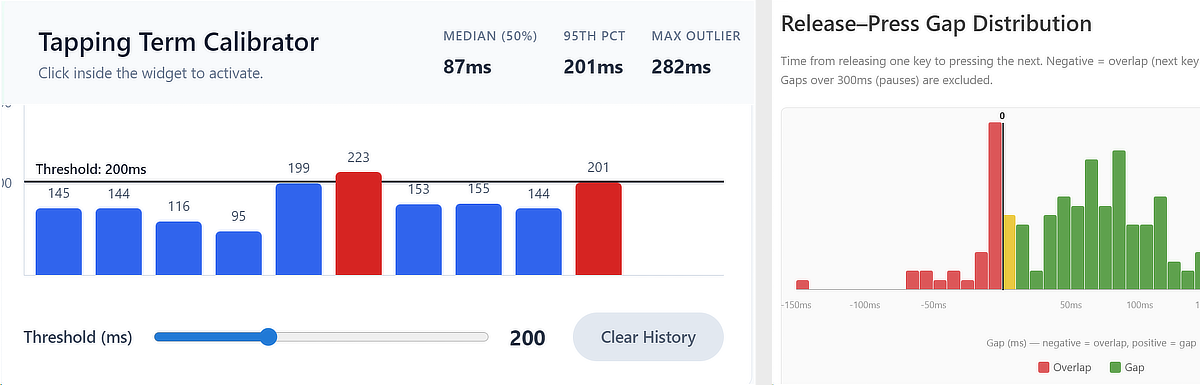
Programmable keyboards like those running QMK, ZMK, or keyboard remapping software such as Kanata support tap-hold behavior: a brief press registers as one action (a tap), while holding the same key longer triggers another, such as a layer switch or a modifier like Ctrl when using home-row or bottom-row mods. The duration that separates the two is called the tapping term. Set it too high and accidental holds become common mid-typing; set it too low and deliberate holds fail to register. Getting it right is personal, because natural key-press duration varies significantly between typists, and even varies from day to day. When you are tired, you may need a slightly longer tap-timeout than usual.
The widget below helps you get a feel for how long you typically hold a tap-key, and in contrast how long a deliberate held action naturally takes for you without feeling sluggish or slowing you down.
How to use the widget
Test both actions separately. First, simulate normal tap input by pressing keys briskly as you would when typing characters. Then clear the history and do a second round where you deliberately trigger held actions, holding each key the way you would to activate a modifier or layer. Start with a threshold you consider reasonable. If you are unsure, 200 to 250 ms is a good starting point (see also the notes below). The widget records the duration of each keypress and plots it relative to your chosen threshold, so you can immediately see whether a press falls within the tap-timeout or beyond it. Aim for about 20 to 30 keypresses per round.
You must do this test with a “dumb” keyboard which does not already implement tap-hold mechanisms, because these will not be picked up with this tool. If you have keys which use tap-hold mechanisms you will see unrealistic low tap-times of just a few milliseconds. Expect typical tap-times for normal typing between 50 ms and 100 ms.
The restriction that you must use a keyboard outputting plain keys, applies to any form of implementation, be it with QMK, Kanata or another remapping option. In case you use a programmable keyboard you can still do the test, but the keys need to register as plain keys. Disable all tap-hold behaviors for the test. In case you normally use Kanata, just type without running the software. The Home-Row-Mods Keyboard Statistics tool introduced below also expects plain keyboard input btw.
Statistics to help you find the right tap-timeout
The median gives you a sense of your typical tap duration, while the 95th percentile shows where your slowest natural taps land. That is the value that matters most for setting the threshold. If your threshold sits below your 95th percentile tap time, you will occasionally misfire holds during normal typing. Once you have your 95th percentile figure, add a small buffer of 10 to 30 ms to account for day-to-day variation.
Tapping Term Calibrator
Click here to activate. History cleared.
Press and Release any letter key to test
Typical tap-timeouts
A starting point of 200 to 250 ms is reasonable for most typists. Beginners may need 300 ms or more until their tap and hold gestures become deliberate and consistent. Experienced users with well-trained home-row or bottom-row mod habits may eventually settle closer to 180 ms or even lower. But there is no prize for a low number. What matters is that you reliably get the action you intended, every time. For reference: I personally use a tap-timeout of 200 to 220 ms at a real-world typing speed of 70 to 80 wpm, with bursts up to 150 wpm or higher.
Implementation
In Kanata, set tap-timeout in your .kbd config to the chosen value in milliseconds. In QMK, set TAPPING_TERM in config.h, or tune it per key via get_tapping_term(). In ZMK, use the tapping-term-ms property on the relevant key binding.
Key Overlap Tester — Home-Row-Mods Keyboard Statistics
When you want to dive in deeper how to fine-tune the timings of your home- or bottom-row-mods you can use the tool below to test the tap-time of individual keys and also find out how long key presses overlap with others. The tool is courtesy of Pluskid.